
Itinerary builder for travel agencies and tour operators.
Less work for your team.
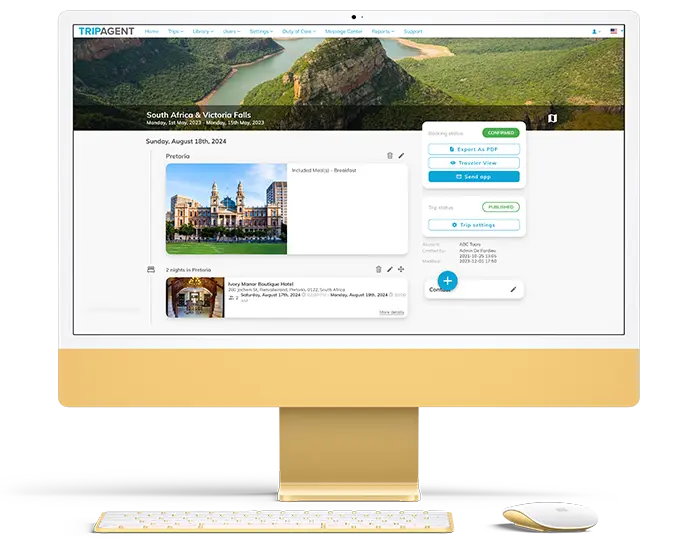
An itinerary builder and planner for travel agents who are tired of retyping bookings. Start with a proposal, import confirmed bookings from your GDS, mid-office system, or supplier documents, then send the finished trip under your own brand by app, web link, and PDF.
-
Quote/Import bookings
-
Build & brand
-
Deliver the trip
Trusted by 300+ travel companies across 35+ countries






- Countries
- 35+
- Founded
- 2009
- Travel Brands
- 300+
- Trips Managed/year
- 4M+
- Rated on G2
- 4.9/5
Travel brands powered by mTrip’s integrated platform
- Globus, world-leading tour operator using mTrip’s Itinerary Builder and Mobile App platform
- Abercrombie & Kent, luxury travel company using mTrip’s tailor-made itinerary and mobile app platform
- Collette, North America’s oldest guided tour operator using mTrip’s Itinerary Builder and Mobile App
- ACIS, premier educational travel operator for student groups using mTrip’s integrated travel technology platform
- Exo Travel, specialist Asia tour operator using mTrip’s Itinerary Builder and Mobile App
- XL Travel, leading travel agency group using mTrip’s integrated mobile and itinerary platform
- AAA, one of the largest leisure travel agencies in North America using mTrip’s white-label travel app and itinerary builder
- Kontiki, Swiss tour operator using mTrip’s integrated itinerary and mobile app modules
- Enchanting Travels, luxury custom travel company using mTrip’s tailor-made itinerary and mobile app platform

“It would’ve been a longer, costlier launch without mTrip. A great product for our needs.”
VP of Customer Experience, ACIS

“It’s a Kontiki expert tourguide in the client’s pocket throughout the trip.” Read Kontiki’s story →
Head of Innovation, Kontiki
How does mTrip’s itinerary planner save time
for agencies and tour operators?
mTrip saves agency time in three places. Bookings come in from your GDS, mid-office systems, or supplier documents instead of being retyped. One edit keeps the web itinerary and the mobile app in sync. Flight changes reach travelers automatically. Agents spend their time on the trip, not on formatting it.
Stop retyping bookings
Read supplier emails, PDFs, Word, and Excel files with the AI Import Wizard, or pull bookings from your GDS and mid-office systems. Reuse saved templates, descriptions, and images instead of formatting them again for each trip.
Edit once. Keep app and web in sync.
Change the itinerary once and the web version and mobile app stay in sync. Flight changes reach travelers without your team editing anything or sending a message. Generate a fresh PDF when you need one.
Send a beautiful branded trip clients can use
Deliver a day-by-day itinerary with e-vouchers, tickets, and documents attached to the right day, under your own brand across app, web, and PDF. Travelers can access their itinerary and documents offline in the app.
Why choose mTrip’s itinerary builder for your travel agency or tour operator?
mTrip is one itinerary management platform that helps travel agencies and tour operators build itineraries faster and deliver polished trips under their own brand. Connect booking systems, coordinate with teams and partners, and adapt the platform to the way your business works. Founded in Montreal in 2009, mTrip serves more than 300 clients in over 35 countries and manages more than 4 million trips a year. It is rated 4.9/5 on G2.
A strong fit for branded itinerary automation and custom workflows. With mTrip, your team can automate booking imports, configure the traveler app’s features and layout, and manage multiple brand accounts on one platform. Our in-house developers can build features and integrations around your processes. Considering an in-house build instead? Read our build vs. buy guide.
Small agencies can start with Trip Agent. Growing teams and tour operators can choose a fully white-label app and integrations suited to their operations.
Choose mTrip when your team needs to:
- Spend less time rebuilding itineraries
Import reservations through GDS and mid-office connections or AI document import, then reuse your team’s templates and content.
- Coordinate trips with colleagues and partners
Work with your operations team, DMCs, and suppliers in the same trip, including complex FIT itineraries and group programs.
- Give clients a branded travel experience
Deliver branded itineraries travelers can open anywhere, including offline. Choose a fully white-label app under your own developer accounts.
- Adapt the platform to your workflow
Configure the traveler experience and work with mTrip’s in-house team on custom features and integrations for your agency.
From bookings to branded itineraries in one itinerary planner.
With mTrip’s itinerary planner, travel agents import bookings, review the details, and manage the itinerary in one workspace. Without it, supplier PDFs, confirmation emails, and booking records arrive in different formats. Your team copies details into Word, formats the trip, and repeats the work when plans change.


Centralize reservations and travel confirmations.
Bring flights, hotels, transfers, and activities together in one editable itinerary. Connect your GDS, mid-office, or back-office system, and use AI import for supported supplier documents and confirmation emails.
- Start from a proposal with itemized pricing, then convert it into the confirmed itinerary when the booking is ready.
- Import flights, hotels, activities, cruises, and transfers.
- Combine information from different booking sources.
- Review travelers, dates, references, and missing details.

Arrange the days. Add your identity.
Use the drag-and-drop trip builder to organize flights, hotels, activities, transfers, and free time. Apply your agency’s logo, colors, and content to the trip.
- Move and reorder trip components as plans change.
- Reuse your team’s templates, descriptions, and images.
- Attach vouchers, tickets, and insurance documents to the relevant day or component (travel document guide).

Share the trip. Keep travelers informed.
Deliver through the mobile app or a web link, and generate a branded PDF from the same itinerary data.
- Your itinerary edits appear automatically online and in the app.
- Travelers can access trip information offline in the app.
- Generate and send a fresh PDF when the trip changes.
Your supplier sends the details.
You make them client-ready.
Bring supported booking documents and text into an editable itinerary, then check the details before sharing.
Import results depend on the source content. Your team reviews dates, names, references, and missing information.
Automatically create itineraries from
supplier documents with AI.
mTrip works as an AI itinerary generator with your agency’s branding. Use mTrip’s AI Import Wizard to turn supported booking confirmations into an editable travel itinerary that carries your logo, colors, and content. Import documents from sources such as Viator, Expedia TAAP, Booking.com, airlines, and other travel providers. Your team reviews the details, adds its own descriptions and images, and saves content to reuse on future trips. To plan the days themselves, Trip Genius suggests daily plans based on traveler preferences, opening hours, and geography. Your team decides what to keep.
- Upload your booking documents. Add supplier PDFs, confirmation emails, Word or Excel files, or paste the text.
- AI builds the itinerary. The AI Import Wizard extracts flights, hotels, activities, and other booking details into an editable day-by-day trip.
- Review, brand, and send. Your team checks the details, adds its content, and delivers the trip through your app, web itinerary, and PDF.
Which booking systems connect
to mTrip’s itinerary builder?
mTrip connects to three GDS: Amadeus, Sabre, and Travelport. Bookings from your global distribution system flow into the itinerary without retyping. mTrip also connects itinerary delivery to the mid-office and back-office systems you use to manage bookings and operations, including Tourplan, Moonstride, Ezus, Juniper, Viaxoft, Facilitatrip, Open Destinations, and Cornerstone. Other tools in your workflow connect through Zapier, and an API supports integrations tailored to your systems. When a supplier sends a document instead, the AI Import Wizard reads supported PDFs, booking emails, Word and Excel files, and pasted text. It turns them into an editable itinerary that your team reviews before sharing. Bookings from different sources come together in one editable itinerary. Your team can also start from a proposal with itemized pricing and convert it into the confirmed itinerary when the booking is ready. More integrations are available on request.
GDS connections



Mid-office & back-office systems








More integrations upon request
API
Automate more with Zapier and our API
Connect mTrip to other tools in your workflow through Zapier, or use our API for an integration tailored to your systems.
What tools does mTrip
give agencies and tour operators?
As an itinerary planner, mTrip gives agencies and tour operators one workspace for every trip, from a tailor-made itinerary to a multi-day group program. The workspace covers drag-and-drop day planning, a shared template and asset library, team and partner collaboration, documents attached to the right day, automatic flight and web and app updates, proposals with itemized pricing, nine languages, and multiple brands in one account.
Drag-and-drop day planning
mTrip’s drag-and-drop trip builder lets agents add, move, and reorder flights, hotels, activities, transfers, and free time day by day. When plans change, the team rearranges the itinerary in one workspace, and the web version and mobile app update automatically.
Your itinerary templates & asset library
mTrip stores your team’s trip plans, descriptions, images, and documents in one asset library. Agents reuse them across itineraries instead of formatting each trip from scratch, so every itinerary carries the same agency content and branding.
Team collaboration
mTrip gives agents and operations staff one place to coordinate each itinerary. Trip records, templates, and assets are shared across the agency, so colleagues work from the same trip record.
External partner access
mTrip lets agencies invite DMCs, suppliers, and partner agencies to contribute directly to a trip. Partners work on the trip itself and do not receive access to the rest of the agency’s account.
Travel documents in context
mTrip keeps e-vouchers, tickets, insurance documents, and PDFs attached to the day or trip component they belong to. Travelers find each document in context, and they can open their itinerary and documents offline in the app.
Automatic flight updates
mTrip tracks flight changes and informs travelers, so your team doesn’t edit the flight or send a message.
Automatic web & app updates
Edit the itinerary once. Your changes appear automatically online and in the mobile app. Generate and send a fresh PDF when needed.
Pre- and post-trip extensions
mTrip adds extra nights, activities, or services before or after the main program inside the same itinerary. Agencies and tour operators keep the core trip and its extensions in one record, and travelers see the whole plan in one place.
An app that fits the trip
mTrip adapts the traveler app’s layout and features to the type of trip, such as cruises, safaris, and independent travel. Agencies configure the content, features, and modules each client sees, under their own brand.
Nine supported languages
mTrip supports nine languages: English, French, German, Spanish, Italian, Portuguese, Dutch, Polish, and Japanese. Confirm coverage for your own content and each output during setup.
Multiple brands, one account
mTrip lets an agency group manage distinct brand identities, settings, and traveler experiences from one account. Divisions and partner agencies each deliver itineraries under their own brand.
Proposals & pricing
mTrip lets agents add itemized pricing and share a branded proposal. When the booking is ready, the proposal converts into the confirmed itinerary.
Can travel agencies and tour operators work with DMCs and suppliers on the same trip?
Yes. Travel agencies and tour operators can bring DMCs, suppliers, and partner agencies into the same trip in mTrip to manage bookings, documents, and itinerary changes alongside their own agents and operations staff.
Partners. Invite DMCs, ground operators, or other partners to collaborate on a trip: they receive access to contribute without sharing your full account access.
Your team. Your agency shares trip records, templates, and assets, so agents and operations staff coordinate the itinerary in one place and reuse the descriptions, images, and documents the team has created for the next trip.
Any trip type. The same platform handles FIT itineraries, group programs, cruises, adventure routes, and trip extensions, and one account can manage several brands, so divisions and partner agencies each deliver itineraries under their own brand. The agency or tour operator then finishes the trip under its own brand.
How do travel agencies and tour operators
deliver itineraries to travelers?
Travel agencies and tour operators deliver each itinerary in mTrip three ways from the same trip data: a mobile app, a web link, and a branded PDF, all carrying their own logo, colors, and images. Vouchers and tickets are attached to the relevant day or component.
Automatic updates. When your team edits the itinerary once, the online version and the mobile app update automatically, so travelers see the change without anyone sending a message. mTrip also tracks flight changes and informs travelers without your team updating details or sending the change manually.
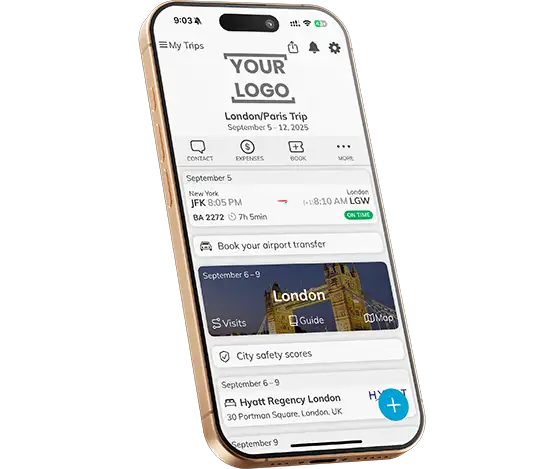
In the app. Travelers can open their itinerary, documents, and maps offline, with Trip Agent or your own fully white-label app. A PDF does not update by itself, so you generate a fresh version from the same itinerary data and send it again when details change.
Mobile app
Let travelers access their itinerary, documents, and maps offline. Choose Trip Agent or your own fully white-label app.
Web itinerary
Share a link that clients can open on their device. Connected web views receive your itinerary changes.

Branded PDF
Generate a document from your itinerary data. When details change, generate and send the updated version.
Hear from the travel teams
working with mTrip.
Wamos and Globus use mTrip for their traveler apps. Their teams describe the app experience and working with mTrip.

“We’ve used the mTrip app for 2 years and highly recommend it. Our clients love it.”
Head of Innovation, Wamos

“Thanks for being a great partner!”
Director of Marketing, Globus
Watch the Globus testimonial ↗
Awards & recognition
 Phocuswright Innovator
  Best Mobile Travel Solution EyeForTravel
-
 Webby Award
 -
 ACTE Global Award
Industry memberships





An itinerary builder for agencies,
tour operators, and DMCs.
mTrip serves travel agencies, tour operators, DMCs, and MICE and events agencies on one platform, with workflows and traveler experiences suited to each business.

Itinerary builder for travel agents
Use mTrip as your agency’s travel planner for personalized FIT trips, resold tours, cruises, and theme park packages. Build and revise proposals with itemized pricing, convert the approved one into the confirmed itinerary, and apply your branding to everything you send.

Itinerary builder for tour operators
Use mTrip’s itinerary builder software for tour operators to build multi-day programs and group departures with reusable itinerary templates. Share content across your team and coordinate each trip with ground DMCs, suppliers, and reselling agencies.

Itinerary builder for DMCs
Use itinerary software for DMCs to organize local services, transfers, and activities into destination programs. Invite partner agencies to collaborate and deliver each traveler’s itinerary under the relevant partner’s brand.
Built around the way
your agency works.
mTrip’s in-house development team builds custom features and integrations around each agency’s workflow, from system connections to traveler-facing features.
Custom development for your agency
Tell us how your team builds and manages trips. We can develop features and connections around your process, so mTrip supports the way your agency works. We agree the scope, cost, and timeline with you before development begins. See what travel agency software really costs beyond the subscription.
Your app, published under your name
With the fully white-label option, publish under your own Apple and Google developer accounts and use your own web domain.
Choose the features travelers see
Configure content, features, and modules for different clients, trip types, and agency partners.
Connect the operation
Bring together named GDS and mid-office integrations, AI document import, and optional duty-of-care tools.
How mTrip compares with manual documents
and other itinerary builders
mTrip combines branded itinerary delivery with control over your app, multiple brand identities, and custom development. Compare the capabilities behind that flexibility.
Scroll horizontally to compare all options →
Branding, app and brands
| Capability | Word / email | Other providers Typical offering |
What mTrip offers |
|---|---|---|---|
| Branding across app, web & PDF | Add your logo and formatting to documents and emails. | Agency logos and colors on itineraries and documents; branded-app services with some providers. | Your brand across every delivery format. Use your agency’s identity in the traveler app, web itinerary, and PDF documents. |
| Your own app, domain & environment | No dedicated traveler app or connected web environment. | Custom-branded apps and app-store listings are available from some providers. | Your own publishing setup. The fully white-label option includes an app under your Apple and Google developer accounts, your own web domain, and a dedicated environment. |
| Multiple brands in one account | Keep separate templates and files for each brand. | Agency and advisor branding. Ask each provider whether separate brands can be managed from one account. | One platform, multiple brand accounts. Manage separate branding, settings, and traveler experiences for your divisions or agency partners. |
| Traveler app features & configuration | Use separate tools for maps, offline access, and notifications. | Mobile itineraries, offline viewing, and flight alerts within the provider’s app. | Choose what your travelers see. Configure features and content, including offline itineraries, documents, maps, destination content, and push notifications. Adapt the app to the trip type. |
Imports, updates and custom development
| Capability | Word / email | Other providers Typical offering |
What mTrip offers |
|---|---|---|---|
| Custom development for your workflow | Create and maintain your own templates and supporting tools. | Built-in settings and templates, with API access or branded-app services on selected offers. | Development around your processes. mTrip’s in-house team can build bespoke features and integrations to fit your agency’s workflow, beyond standard configuration. |
| Booking imports & system connections | Copy booking details from systems and supplier confirmations. | Supplier imports, selected GDS connections, and API access on some offers. | Connect systems and supplier documents. Combine GDS, mid-office, and back-office connections with AI import. Extend your workflow through Zapier, the API, or custom integrations. |
| Itinerary management & automatic updates | Edit and resend documents after each change. | Shared web and app itinerary updates, plus flight-status alerts. | Update once, inform travelers. One itinerary feeds the app and web versions, and flight changes reach travelers without staff action. Regenerate PDFs when needed. |
Collaboration, trip types and risk tools
| Capability | Word / email | Other providers Typical offering |
What mTrip offers |
|---|---|---|---|
| Team & external partner collaboration | Coordinate through email threads and shared files. | Shared editing, reusable content, and supplier or agency collaboration. | Bring your team and partners into the trip. Give external partners access to contribute without sharing full account access. Reuse your team’s templates, images, descriptions, and documents. |
| Features & layout adapted to the trip type | Create and adjust document templates for each type of trip. | Itinerary templates and day-by-day layouts for presenting different trips. | A traveler experience adapted to each trip. Use different features and layouts for FIT, group, cruise, theme park, and adventure trips. The traveler app adapts to the type of trip, so clients see the tools and information relevant to their experience. |
| Risk and Disruption Management | Use a separate service and workflow. | Flight-status alerts and trip-change notifications. Ask whether risk management is offered and what it costs. | Trip updates plus risk and disruption tools. Flight-status alerts and trip-change notifications. The paid risk-management add-on adds a disruption and risk dashboard, country risk information, and risk alerts. Explore risk management → |
Compare developer-account ownership, configuration, integrations, and the experience your travelers receive. Ask each provider to demonstrate the workflow using your booking sources.
Read our buyer’s guide to itinerary builders
mTrip differs from other itinerary builders in three ways: with the fully white-label option, travelers get an app published under the agency’s own Apple and Google developer accounts; one account manages several brands; and mTrip’s in-house team builds custom features and integrations. For a wider look at the market, our guide covers eight platforms and the criteria to test in a demo.
What are mTrip’s
app options and pricing?
mTrip offers two options. Trip Agent is a shared app branded with your logo and colors, with no long-term commitment and no setup fee by default. The fully white-label option is a dedicated environment with an app published under your own developer accounts, a project-based setup fee, and a one-year engagement. Monthly pricing is based on itinerary volume.
Trip Agent
Your logo and colors within the shared Trip Agent app.
- Start managing itineraries and sending trips after subscribing.
- Monthly subscription based on itinerary volume.
- No long-term commitment. Cancel anytime.
- No setup fee by default. Start the same day after your demo when no additional setup is needed.
Additional support, launch assistance, configuration, or integrations may involve a setup fee.
Fully white-label
Your agency’s app, published under your own developer accounts on the App Store and Google Play.
- Dedicated environment and your own web domain.
- Configure traveler-facing features and content.
- Setup fee scoped to your project, plus a monthly fee.
- One-year engagement. Custom development available.
Timing depends on integrations and project scope. We’ll confirm the plan with your team.
Monthly pricing is based on itinerary volume and selected modules, rather than the number of seats. We’ll quote for your requirements. Risk management is available as a paid add-on with either option.
Start with a demo
Tell us how your team prepares trips. See the builder, system connections, and delivery options in a 30-minute call.
Try it with your team
A free trial is available after the demo. Evaluate your workflow and discuss any integration or setup needs.
Agree your setup
Choose the app option and confirm any assistance, configuration, or integrations you need.
Itinerary builder FAQs.
Details to help you decide whether mTrip’s itinerary builder fits your agency or tour operator business.
Choosing an itinerary builder
What is an itinerary builder?
An itinerary builder, also called an itinerary planner, organizes flights, hotels, transfers, activities, and documents into a structured trip plan. Travel agencies and tour operators use this itinerary planning software to prepare trips for their clients. With mTrip’s travel itinerary builder, your team can import bookings, personalize the trip, and deliver it through app, web, and PDF.
How do itinerary building and itinerary management work together?
Use an itinerary builder to create and personalize the trip. Itinerary management covers the ongoing work: centralizing reservations, coordinating with colleagues and partners, and keeping trip details up to date. With mTrip, your team can do both in one platform, so changes made while managing the itinerary carry through to the trip your travelers already have.
Is mTrip suitable for small agencies as well as larger teams and tour operators?
Yes. mTrip works with small and mid-size travel agencies, larger agency teams, and tour operators. Small agencies can start with Trip Agent, which has no setup fee by default and no long-term commitment. Teams that need their own app and dedicated environment can choose the fully white-label solution. mTrip is built for travel agents working in agencies and teams, and for tour operators.
Who uses mTrip’s itinerary builder?
More than 300 travel companies in over 35 countries use mTrip. They include travel agency groups such as AAA and XL Travel, tour operators such as Globus, Collette, and Kontiki, tailor-made and luxury travel specialists such as Abercrombie & Kent and Enchanting Travels, Asia specialist Exo Travel, and student travel operator ACIS. DMCs and MICE and events agencies use the same platform to build itineraries and deliver them to travelers by app, web, and PDF.
How much time does mTrip save per itinerary?
mTrip removes the retyping. Instead of copying flights, hotels, and transfers from each confirmation into a document, your team uploads supplier PDFs or emails, or lets GDS and mid-office connections bring the bookings in, then reviews a trip that is already laid out day by day. Saved templates, descriptions, and images fill in the rest. Later changes are made once and reach the app and web itinerary, so nothing has to be rebuilt and resent. To measure the gain on your own trips, time one representative itinerary during your free trial and compare it with your current process.
Can the builder handle FIT, group tours, cruises, adventure travel, and multi-day programs?
Yes. Manage personalized FIT itineraries, group departures, cruises, adventure trips, and multi-day programs in the same platform. Add pre- and post-trip extensions within the itinerary. The mobile app layout and features adapt to the trip type.
Does mTrip work differently for travel agencies, tour operators, and DMCs?
Travel agencies can build personalized trips or rebrand resold programs. Tour operators can reuse templates for departures and collaborate with suppliers and reselling agencies. DMCs can prepare destination programs for partner agencies. MICE and events teams can combine flights, hotels, transfers, and meeting schedules in one participant itinerary.
What makes mTrip different from other itinerary builders?
mTrip combines itinerary building and management with configurable traveler apps and custom development. Your team can choose the features and content travelers see, with layouts adapted to FIT, group, cruise, theme park, and adventure trips. Manage multiple brand accounts on one platform. The fully white-label option includes an app under your own Apple and Google developer accounts, your own web domain, and a dedicated environment. mTrip’s in-house team can build bespoke features and integrations around your workflow.
Booking imports & integrations
Does it integrate with my current booking or mid-office system?
mTrip offers connections to Amadeus, Sabre, and Travelport, plus mid-office systems including Tourplan, Moonstride, Viaxoft, Ezus, Juniper, Open Destinations, and Facilitatrip. An API and Zapier provide additional options. Tell us which systems you use so we can confirm supported information flows, update behavior, and implementation scope.
Can mTrip centralize reservations and travel confirmations from different suppliers?
Yes. With mTrip, travel agencies can combine flights, hotels, transfers, activities, and supporting documents in one itinerary. Import booking information through supported GDS, mid-office, and back-office connections, or extract details from supplier confirmations with AI. Your team can then review and manage the trip in one place.
Can travel agencies use AI to generate itineraries from booking confirmations?
Yes. With mTrip’s AI Import Wizard, a travel agency can generate an editable itinerary automatically from supported PDFs, confirmation emails, Word documents, Excel files, booking web pages, and pasted text. The AI extracts the booking details, such as flights, hotels, and activities, and lays them out day by day. Your team reviews dates, traveler names, references, and missing information, then adds its branding and content before sharing the trip through the app, web itinerary, or PDF.
Is mTrip a travel itinerary generator with branding?
Yes. mTrip generates itineraries from your bookings and supplier documents, through GDS and mid-office connections or the AI Import Wizard, and applies your agency’s branding to every trip. Travelers see your logo, colors, and content in the mobile app, web itinerary, and PDF. Unlike consumer AI trip planners, mTrip is built for travel agencies and tour operators, so your team reviews each trip before it reaches the client.
Do I need to clean up our existing itineraries before switching to mTrip?
Start with representative documents so you can evaluate AI import and review the results. Historical trips, account records, templates, and attachments may need separate preparation. Agree the migration scope and any assistance before launch.
Does mTrip include ready-made itinerary content?
Your team can import supported supplier documents and booking text with AI, then review and edit the results. You can also save and reuse your own templates, descriptions, images, and documents. mTrip does not include a ready-made content library for building proposals.
Collaboration & custom development
Can our DMCs and suppliers work on a trip?
Yes. External partners receive access to collaborate on the trip without sharing your full account access. We’ll walk through partner access and how it fits your workflow during the demo.
Can mTrip adapt to our agency’s workflow with custom development?
Yes. mTrip’s in-house development team can build custom features and integrations around your agency’s processes, systems, and traveler experience. We review how your team works, identify what configuration can cover, and scope any additional development with you. Custom development has its own agreed cost and timeline.
Branding, documents & trip updates
Can travel agents design branded digital trip documents with mTrip?
Yes. Travel agency teams can use mTrip to create digital itineraries and travel documents with their logo, colors, images, and content. Deliver the trip as a branded PDF, a web itinerary, or through a mobile app, and attach vouchers, tickets, and insurance documents to the relevant day or component. Choose Trip Agent with your logo and colors, or a fully white-label app published under your agency’s own name.
Are flight changes updated and communicated to travelers automatically?
Yes. mTrip updates flight changes and communicates them to travelers automatically. Your team does not need to change the flight details or send the update manually.
What happens when an itinerary changes?
When your team edits an itinerary in mTrip, the changes appear automatically in the online itinerary and mobile app. Generate and send a new PDF for clients using a document version.
Is the platform fully white-label?
The fully white-label solution gives your agency its own app, published under your Apple and Google developer accounts, a dedicated environment, and its own web domain. Configure traveler-facing features, content, and branding. Trip Agent is the shared-app option with your agency’s logo and colors.
Can we use the itinerary builder without launching our own app?
Yes. Trip Agent provides access to the itinerary builder and a shared traveler app with your logo and colors. You can also deliver trips through web itineraries and branded PDFs. A dedicated app-store launch is part of the fully white-label option.
Can we manage multiple brands from one account?
Yes. Manage separate identities, settings, and traveler experiences for your divisions or agency partners from one account. Discuss the brands and configuration you need during setup.
Pricing, setup & support
How does pricing work?
Monthly pricing depends on itinerary volume and selected modules rather than the number of seats. Trip Agent has no long-term commitment and no setup fee by default; additional support, launch assistance, configuration, or integrations may involve a setup fee. A fully white-label solution has a scoped setup fee, a monthly fee, and a one-year engagement. Risk management is a paid add-on with either offer.
Is there a free itinerary builder for travel agents?
mTrip offers a free trial, so your team can build and send real itineraries before paying anything. After the trial, Trip Agent is the low-cost way to continue: no setup fee by default, a monthly fee that scales with your itinerary volume, and no long-term commitment, so you can cancel anytime. Fully free tools are usually built for individual travelers, so check whether they import bookings and put your agency’s brand on every trip.
How long does it take to get started?
With Trip Agent, you can start the same day after your demo when no additional setup is needed. A fully white-label app is typically live in 2–3 weeks, depending on integrations and project scope. Confirm any configuration, migration, or custom development needs with our team.
Can we prepare proposals before bookings are confirmed?
Yes. Build a trip proposal, add itemized pricing, and revise the itinerary as you discuss it with your client. When the booking is ready, convert the proposal into a confirmed itinerary.
Is there a demo or free trial available?
Yes. Request a 30-minute demo to see the builder, AI Import Wizard, and delivery options, and discuss your agency’s workflow. A free trial is available after the demo.
Is traveler data secure?
Security should be part of your evaluation. Review mTrip’s current information about hosting, encryption, access controls, and data-processing terms in the mTrip Trust Center. Confirm your agency’s specific requirements with our team before launch.
See where your team
can save time.
Walk through booking import, itinerary building, and trip updates. See which manual steps your team can reduce and how you can deliver a professional trip under your brand.
Tell us which tasks take the most time and which booking systems you use. We’ll focus the walkthrough on your workflow and discuss pricing for your itinerary volume.
Your 30-minute demo
- Explore the builder and AI import.
- Review how your team builds and updates trips.
- Compare app options and discuss pricing.
Free trial available after your demo.